


Description
Button Vector Illustration – Elevate Your Fashion Design Projects
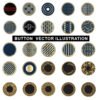
The Button Vector Illustration is a high-quality digital asset designed to meet the exacting standards of professional fashion designers, product developers, and graphic creators. Each vector element has been crafted with precision, offering realistic button shapes, detailed stitching holes, rim styles, and elegant surface shading that mimics authentic materials.
Ideal for tech packs, CAD illustrations, apparel prototypes, and digital product visualizations, this vector ensures a clean, polished look for both print and screen use. Created in Adobe Illustrator (AI) format, the file is fully editable — allowing customization in size, color, and shape to match your project’s design language.
Professional Detailing in Button Vector Illustration
This Button Vector embodies the fusion of creative design and technical accuracy. Each button has been modeled using precise geometric construction, maintaining a perfect balance between aesthetic refinement and manufacturing feasibility.
From simple four-hole buttons to decorative rimmed styles, this vector pack offers a versatile selection that can be applied to garment mockups, tech packs, line sheets, or presentation templates. Every button is drawn in vector format, ensuring smooth scalability and print-ready sharpness at any resolution.
Applications of Button Vector Illustration
The Button Vector can serve as a core asset across multiple domains of fashion and product design. Whether you’re building a new apparel collection, developing accessories, or creating marketing visuals, this file integrates seamlessly into your workflow.
Common applications include:
-
Fashion Tech Packs: Add precision visuals to factory specifications
-
Apparel CADs: Illustrate buttons for tops, jackets, trousers, or coats
-
Digital Fashion Mockups: Enhance garment presentation boards
-
Accessory Design Sheets: Visualize button and fastening options
-
Product Visualization: Create digital prototypes with realistic fittings
By using the Button Vector , designers save time and maintain a professional, factory-ready standard in every design document.
Editable Design Features in Button Vector Illustration
Crafted entirely in Adobe Illustrator (AI), the Button Vector offers unparalleled flexibility. Every vector path, anchor, and fill is editable — allowing you to modify line thickness, colors, shadows, and highlights effortlessly.
The pack supports layered vector organization, ensuring clear separation of each button type for easier editing. It’s compatible with all major vector editing tools, including CorelDRAW, Affinity Designer, and Figma.
This makes the Button Vector a future-proof asset for digital fashion workflows, whether you’re designing flat sketches or building 3D prototypes.
Key Features of Button Vector Illustration
(AI Format)
-
25+ Realistic Button Designs: Includes rimmed, flat, and embossed variations
-
Fully Editable in Adobe Illustrator (AI): Adjust shape, color, and details
-
Clean Linework and Precise Geometry: Ensures accurate scaling and printing
-
Perfect for Fashion CADs and Tech Packs: Industry-standard vector precision
-
High-Resolution and Print-Optimized: Suitable for digital and physical applications
-
Organized Layer System: Easy navigation and customization
-
Compatible with All Major Vector Software: Seamless integration for professionals
-
Ideal for Designers and Apparel Brands: Enhances workflow and visual communication
Each vector element in the Button Vector is optimized for clarity and proportion, ensuring consistency in both fashion documentation and digital design.
Why Choose the Button Vector
In professional fashion production, small details define quality. The Button Vector captures this principle — allowing you to present accessories with the same finesse as full garments. It eliminates the need for repetitive drawing, streamlining your tech pack creation and enhancing your brand’s visual consistency.
Whether you work in fashion design, product visualization, or graphic illustration, this asset adds an edge of realism and precision that elevates your creative output.
Technical Specifications of Button Vector
-
File Format: Adobe Illustrator (.AI)
-
Resolution: Vector-based (Infinite scalability)
-
Compatibility: Illustrator CC+, CorelDRAW, Affinity Designer, Sketch, Figma
-
Color Mode: CMYK and RGB compatible
-
File Organization: Grouped and named layers for each button type
These specifications ensure the Button Vector functions flawlessly across both print and digital workflows.
Creative Use Cases of Button Vector Illustration
The Button Vector can enhance:
-
Fashion education materials
-
Digital fashion design portfolios
-
Garment specification sheets
-
E-commerce product visualization
-
Virtual garment modeling references
By incorporating the Button Vector into your creative toolkit, you maintain a cohesive, professional visual identity across every project — from prototype to production.
Conclusion
The Button Vector illustration represents the intersection of precision engineering and creative artistry in digital fashion. With clean vector lines, realistic detailing, and full editability, it serves as an indispensable asset for fashion designers, product developers, and digital artists.
Its adaptability across various applications — from CAD layouts to fashion presentations — ensures maximum value and professional polish. Elevate your workflow today with the Button Vector, and bring every design to life with unmatched technical clarity and visual appeal.
Follow Our Social Media Post for regular Updates
- https://www.pinterest.com/MDFH2024/
- https://x.com/MDFH2024
- https://www.behance.net/MDFH2024
- https://www.facebook.com/mydigitalfashionhub
- https://www.instagram.com/mdfh2024/
Free Download – mydigitalfashionhub.com
Similar Items: Norwester.usa photos, images, assets | Adobe Stock

Reviews
There are no reviews yet.